On this page
Short answer
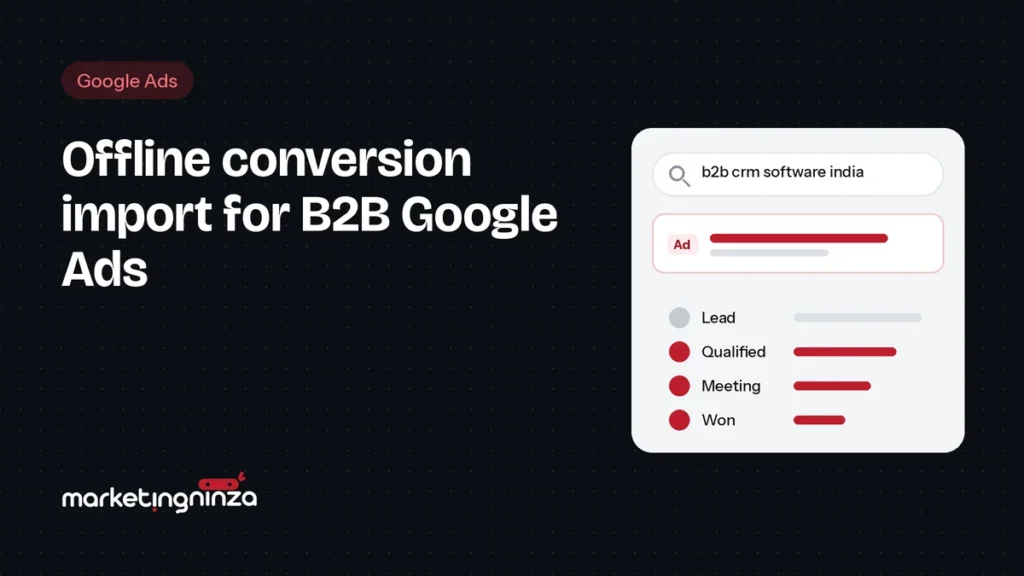
Offline conversion import sends what happens after a form fill (a lead qualified, a meeting booked, a deal won) from your CRM back to Google Ads. Bidding then learns which clicks lead to sales conversations instead of treating every form fill as a win. Google now recommends doing this through enhanced conversions for leads.
Most B2B Google Ads accounts optimise for the wrong thing. The conversion action is “form submitted”, so Smart Bidding goes looking for more form submissions. It finds them: from students, job seekers, competitors and companies far too small to buy. The cost per lead falls, and sales stops calling the leads back.
The fix is to tell Google what happened next. This guide explains how offline conversion import works for B2B, what changed with enhanced conversions for leads, and the steps to set it up.
Key takeaways
- Bidding on raw form fills teaches Google to find cheap, low-quality leads.
- Offline conversion import sends qualified leads, meetings and deals from your CRM back to Google Ads.
- Google recommends enhanced conversions for leads, which matches leads using hashed email as well as the click ID.
- You need clean CRM stages and enough monthly volume before switching bidding to them.
Why form-fill bidding fails in B2B
Google’s bidding algorithms are good at finding more of whatever you count as a conversion. In B2B, a form fill is a weak signal: a large share of submissions are never going to buy, and the platform can’t tell them apart from your best prospects.
So the algorithm does what it’s told. It shifts budget towards the searches, audiences and placements that produce the most form fills at the lowest cost, which are rarely the ones that produce customers.
Watch out
A falling cost per lead after switching to automated bidding is not proof it’s working. Check how many of those leads sales accepted before celebrating.
What offline conversion import does
Offline conversion import closes the loop between Google Ads and your CRM. When a lead moves to a stage you care about, that event is sent back to Google and credited to the ad click that started it.
A typical B2B setup imports three or four stages:
| Stage | What it means | Use in Google Ads |
|---|---|---|
| Lead | Form submitted on your site | Secondary: observe only |
| Qualified lead | Sales accepts it as worth pursuing | Primary: what bidding optimises for |
| Meeting booked | A discovery or demo call is scheduled | Primary once volume allows |
| Deal won | Contract signed, with its value | Reporting, and value-based bidding later |
With qualified leads as the primary conversion, Google’s bidding starts favouring the searches and audiences that produce leads sales wants, even if they cost more per form fill.
GCLID import vs enhanced conversions for leads
There are two ways to match a CRM event back to a click.
Click ID (GCLID) import
When someone clicks your ad, Google adds a click ID, the GCLID, to the landing page URL. You capture it in a hidden form field, store it with the lead in your CRM, and send it back with each later conversion. It works, but it breaks whenever the ID is lost: a visitor who leaves and comes back later, a form that strips URL parameters, or a CRM field nobody maps.
Enhanced conversions for leads
Enhanced conversions for leads adds user-provided data, typically the email address from the form, hashed before it leaves the browser. The Google tag sends it when the form is submitted; later, you upload the same hashed email with the conversion, and Google matches the two. Google describes it as an upgraded form of offline conversion import and recommends moving existing setups to it.
Enhanced conversions for leads
- More durable: matching doesn’t depend on one ID surviving the journey
- Works with the tag you already use (Google tag or Tag Manager)
- Google’s recommended setup, so it’s where new features land
Things to plan for
- Needs the form to capture an email, and the CRM to keep it
- You must have consent and a privacy policy that covers it
- Still worth sending the GCLID too whenever you have it
Note
Google moved conversion uploads for offline import and enhanced conversions for leads to the Data Manager, and from 15 June 2026 uploads through the old Google Ads API route are blocked for most developers. If an agency or tool built your upload years ago, check it still runs.
How to set it up, step by step
- Agree the stages with sales. Write down what “qualified” means and which CRM stage marks it. Without this, every number that follows is disputed.
- Capture the right data on every form. A business email field, plus a hidden field that stores the GCLID from the landing page URL.
- Turn on enhanced conversions for leads in Google Ads (Goals › Conversions › Settings) and confirm the Google tag sends the hashed email on submission.
- Create a conversion action per stage with the import source set, and mark qualified lead (or meeting) as primary. Keep the raw form fill as secondary.
- Connect your CRM. Use the Data Manager, a native integration where your CRM has one (HubSpot and Salesforce do), or a tool like Zapier, so stage changes upload automatically, ideally daily.
- Check matching after a week. Google Ads shows upload diagnostics. Fix missing emails or click IDs before relying on the data.
- Switch bidding once there’s enough volume. Move to Maximise conversions or target CPA on the qualified-lead action when it’s getting a few dozen conversions a month; before that, keep it as an observation.
Tip
Upload stage changes as soon as they happen. Google only credits conversions within your click-through conversion window, and fresh data trains bidding faster than a monthly batch.
How much volume do you need?
Automated bidding needs a steady flow of the conversion it optimises for. Many B2B accounts don’t get enough qualified leads per campaign to bid on them directly at first. Two common fixes:
- Consolidate campaigns so fewer campaigns share more conversion data.
- Bid on the earliest reliable stage. If deals are rare, optimise for qualified leads or meetings, and use won deals for reporting and value rules.
Example
A B2B SaaS client of ours had a healthy cost per lead and a sales team ignoring most of the leads. After restructuring campaigns around buying intent and importing qualified leads as the primary conversion, cost per qualified lead fell by 42% and qualified sales leads grew 2.3×, even though cost per lead went up.
If you don’t tell Google which leads were good, it will keep finding you more of the bad ones.
Common mistakes
- Leaving the raw form fill as a primary conversion alongside qualified leads
- Uploading once a month, so bidding learns from stale data
- No agreed definition of “qualified”, so stages are used inconsistently
- Forms that don’t store the GCLID, or CRMs that overwrite it
- Switching to automated bidding with only a handful of qualified leads a month
Frequently asked questions
Do I need a CRM for offline conversion import?
You need somewhere that records what happened to each lead, with its email or click ID. A CRM is the usual place; a well-kept spreadsheet can work at very low volume, uploaded through the Data Manager.
Is offline conversion import the same as enhanced conversions for leads?
Enhanced conversions for leads is Google’s upgraded version of offline conversion import. It adds hashed user data, such as email, to the matching, which makes it more reliable. Google recommends it for new and existing setups.
How long before bidding improves?
Expect a learning period of a few weeks after switching the primary conversion. Judge results on cost per qualified lead over one to two months, not on the first week.
Does this work with Performance Max?
Yes. Performance Max optimises towards your primary conversions, so importing qualified leads is one of the best ways to stop it chasing cheap form fills.
If you run B2B campaigns on Google, this is one of the highest-value fixes available. Our Google Ads for B2B service includes it from the first month.
Want to know what Google is actually optimising for in your account?
Book a free pipeline audit. We check your conversion setup and recent leads, and show you what to fix first.
Book a free pipeline audit